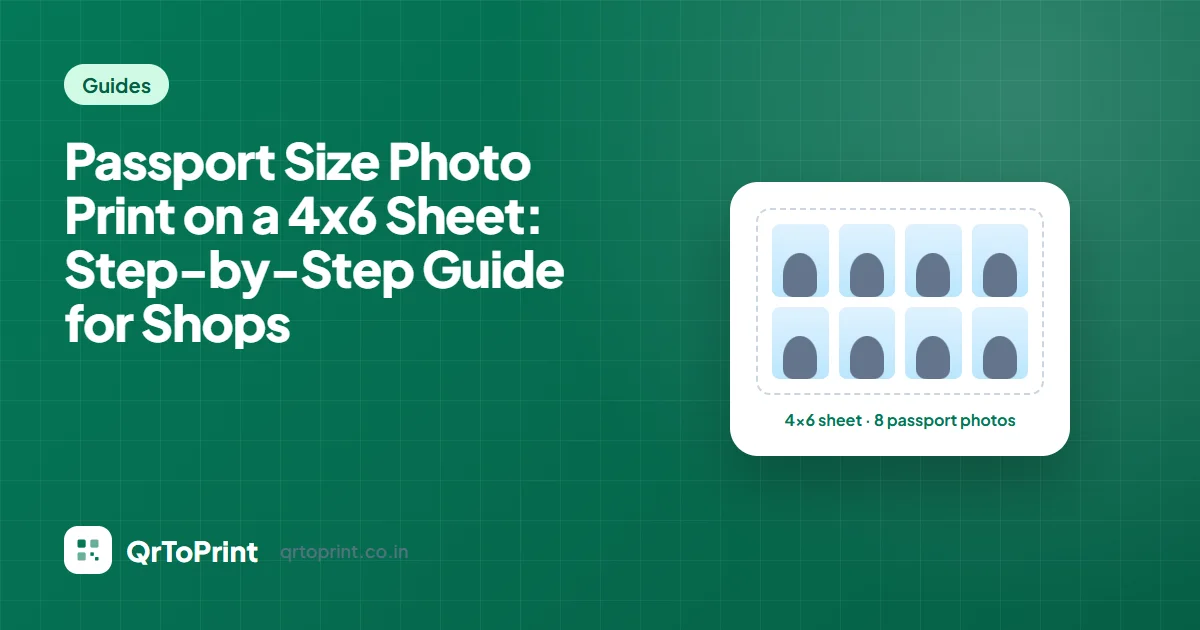
To print passport size photos on a 4x6 sheet, crop the photo to 35 × 45 mm, arrange copies in a grid with small gaps for cutting, print at 100% scale (no “fit to page”) on 4x6 inch glossy photo paper, and cut along the guide lines. A standard 4x6 sheet can usually fit around 8 photos of this size in two rows, depending on spacing.
This guide covers sizes, layout, printer settings and common mistakes.
Standard passport photo sizes in India
Different documents ask for different sizes. Always check the latest requirement on the official portal, but these are the most common:
- 35 × 45 mm — the most common “passport size” used for many forms and applications.
- 51 × 51 mm (2 × 2 inch) — used for some visa applications, such as the US.
- Stamp size (approx. 20 × 25 mm) — used on some forms and admit cards.
For online forms, portals also specify file size (in KB) and pixel dimensions, which is different from print size.
What you need
- A clear photo with a plain white or light background
- A computer or phone with photo layout software
- A colour printer (an ink tank printer works well)
- 4x6 inch glossy photo paper
- A paper cutter or sharp blade and ruler
How many photos fit on a 4x6 sheet?
A 4x6 inch sheet is about 102 × 152 mm. With 35 × 45 mm photos:
- In landscape orientation (152 mm wide), 4 photos fit across with small gaps.
- 2 rows fit vertically (2 × 45 mm = 90 mm, within 102 mm).
That gives 8 photos per sheet with space for cutting margins. Stamp-size layouts can fit many more.
Step-by-step: printing passport photos
- Take or receive a good photo. Face centred, eyes open, neutral expression, even lighting, no shadows on the background.
- Crop to the correct ratio. For 35 × 45 mm, the ratio is 7:9. The face should cover most of the height, as per the requirement.
- Adjust brightness and background. Slightly brighten if needed. Keep colours natural.
- Create the layout. Place 8 copies on a 4x6 canvas at exact physical size (35 × 45 mm each) with 2–3 mm gaps.
- Add cutting lines. Thin light-grey guide lines make cutting faster and more accurate.
- Set printer options.
- Paper size: 4x6 inch (10 × 15 cm)
- Paper type: Glossy / Photo paper
- Quality: High / Best
- Scale: 100% / Actual size — turn off “Fit to page”
- Print a test. Measure one photo with a ruler to confirm the size.
- Cut and pack. Cut along guide lines and hand over in a small envelope.
Where QR printing helps
Cropping a photo to the exact passport size still needs a photo editor — QrToPrint does not crop or resize photos. What it does speed up is everything around it:
- Customers send the photo without WhatsApp — they scan your QR and upload the original JPG or PNG, so it is not compressed.
- Ready-made sheets print in one step — if you or the customer already made a 4x6 sheet in a photo editor, upload it and print it at 1 photo per page on the paper size you offer.
- Quick multi-photo prints — for photos that don’t need an exact official size, the customer can pick a layout of 2, 4, 6 or 9 photos per page.
- Colour jobs go to the colour printer automatically, and the customer sees the price before paying by UPI or at the counter.
See all features.
Common mistakes to avoid
- “Fit to page” left on — photos print larger or smaller than required.
- Wrong paper type setting — ink smudges or colours look dull on glossy paper.
- Busy backgrounds — many applications reject photos with patterned or dark backgrounds.
- Over-editing — heavy filters or skin smoothing can lead to rejection.
- Low-resolution images — WhatsApp-compressed photos look blurry when printed. Ask for the original file. We explain why in WhatsApp printing vs QR printing.
- Glasses glare and shadows — ask customers to remove glasses if there’s reflection.
Tips for a professional result
- Use a white wall or a plain white sheet as the background.
- Use soft, even light from the front; avoid overhead-only lighting.
- Keep the camera at eye level.
- Store photo paper flat and away from humidity.
- Run a nozzle check on ink tank printers if colours start looking off.
Print size vs digital upload size
Customers often confuse the printed photo with the photo they need to upload online. They are different:
- Printed photo — measured in millimetres (e.g. 35 × 45 mm) and printed on photo paper.
- Digital photo for forms — measured in pixels and file size (e.g. under a specified KB limit), usually JPG.
Many exam and job portals publish exact pixel dimensions and KB limits. Offering to resize and compress photos for uploads is a quick add-on service alongside printing. Keep the original high-quality file for printing, and create a separate compressed copy for the upload.
Pricing passport photos in your shop
Passport photos are a high-margin service compared to B&W copies. Common options:
- Price per set (for example, 8 photos on one sheet)
- Combo with form filling or document printing (charged as your own service)
- Extra charge for editing or background cleaning
For more ideas like this, see 12 ways to increase print shop income.
FAQ
What is the passport size photo size in cm?
The common passport size is 3.5 cm × 4.5 cm (35 × 45 mm). Always verify the exact requirement for the specific application.
Can I print passport photos on normal A4 paper?
You can, but photo paper gives better colour, sharpness and durability. Many offices prefer glossy photos.
Which printer is best for passport photos?
A colour ink tank printer that supports 4x6 photo paper works well for most shops. Read our guide to the best printer for a xerox shop.
Can customers send passport photos through a QR code?
Yes. With QR printing software like QrToPrint, the customer scans your shop QR and uploads the photo from their phone. You still crop it to the exact size in a photo editor if the form needs an official size.
Take photo orders the easy way
Let customers send photos by QR instead of WhatsApp, pay by UPI, and print on the right printer. See how it works, check pricing, or start the free demo.